命令行配置代理
测试地址
curl https://www.google.com
cmd配置
set http_proxy=http://127.0.0.1:10809set https_proxy=http://127.0.0.1:10809
powershell配置
$env:http_proxy="http://127.0.0.1:10809"$env:https_proxy="http://127.0.0.1:10809"$env:NO_PROXY="localhost,127.0.0.1"
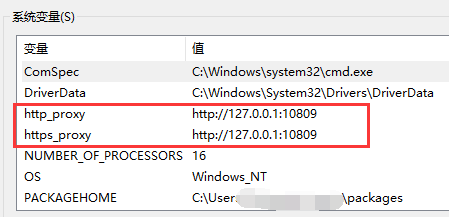
或者直接添加环境变量
wsl中配置
export all_proxy='http://127.0.0.1:10809'
git bash配置
git config --global https.proxy http://127.0.0.1:10809git config --global https.proxy https://127.0.0.1:10809git config --global http.proxy 'socks5://127.0.0.1:10809'git config --global https.proxy 'socks5://127.0.0.1:10809'